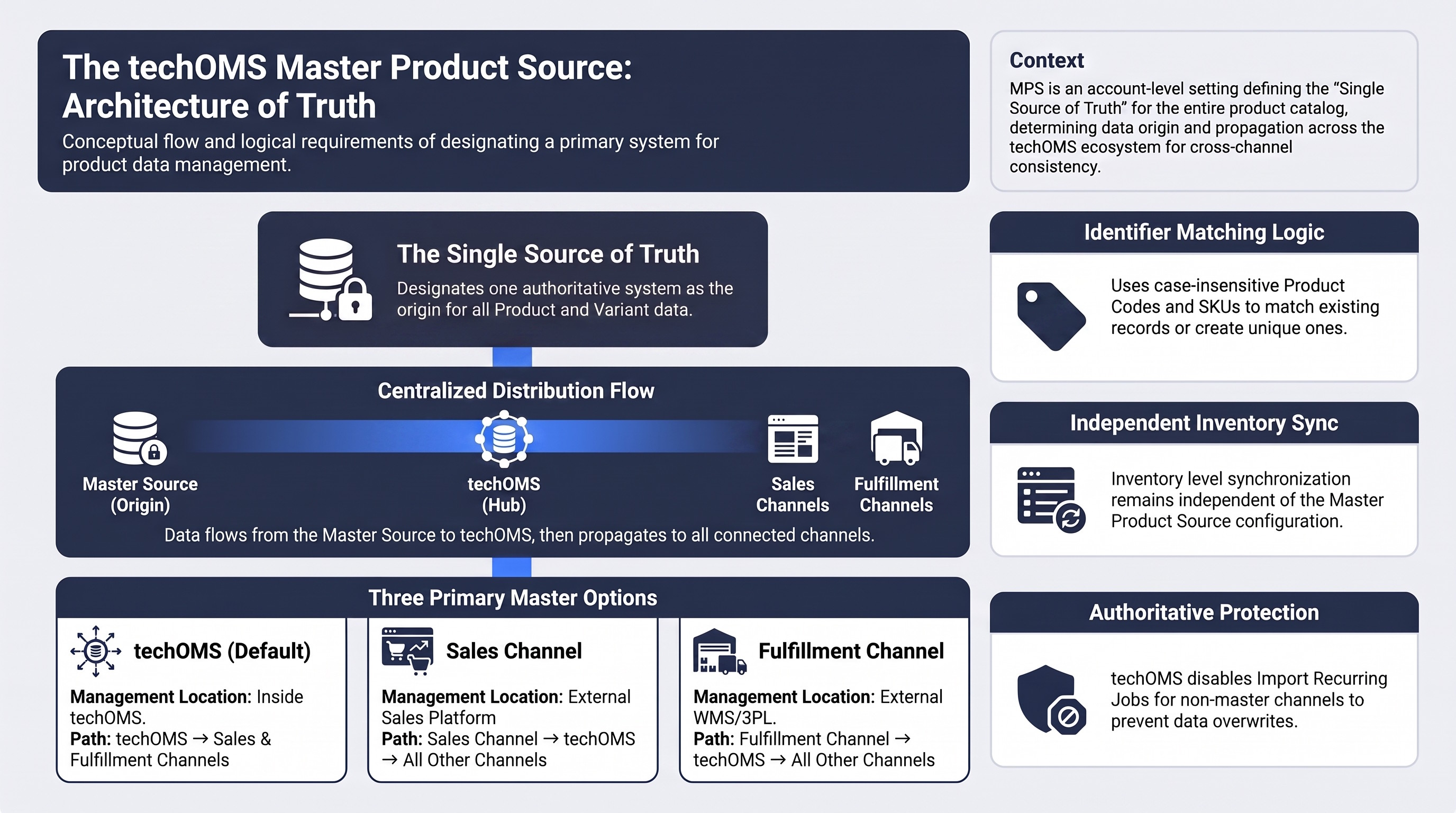
When you manage Products across multiple Sales Channels and Fulfillment Channels, you can use the Master Product Source to designate a single system as the source of truth for your Product catalog.
This article explains how the Master Product Source works, how techOMS matches and validates Products during plugin-based synchronization, which synchronization flows are available, and what you should consider when configuring your catalog.
Prefer listening? You can download the podcast-style audio attached to this article, which walks you through the key points.
 | AI-Assisted & Human-Reviewed: For general information only. Please double-check important details. | |
TABLE OF CONTENTS
- Definition
- Usage and Requirements
- Product Matching Logic During Sync
- Available Options and Sync Flows
- Final Considerations and Set Up
Definition
You use the Master Product Source to define where your Product data originates. You configure this setting at the Account level.
When you select a Master Product Source, techOMS imports Product data from that source, whether you select techOMS, a supported Sales Channel, or a supported Fulfillment Channel, and distributes the data to your other connected Channels.
Usage and Requirements
When you synchronize Products through supported Sales Channel or Fulfillment Channel integrations, techOMS distinguishes between an incoming record that matches an existing Product or Variant and an incoming record whose identifiers create a conflict.
You should keep Product Codes and Variant SKUs unique across the applicable Product catalog. For comparisons covered by Product synchronization, techOMS treats relevant Product Code and Variant SKU values case-insensitively.
You typically define your Master Product Source when you:
- Set up a new Account and decide where you want to manage your Product catalog.
- Migrate Product management from one system or Channel to another.
 | When you change the Master Product Source in a live environment, you may introduce duplicate or conflicting Product data that requires manual cleanup. techOMS also restricts Recurring Jobs for Product imports from non-master Channels. If you are planning this transition, we highly recommend carefully reviewing the following configurations before and after changing your Master Product Source:
| |
| | ||
Product Matching Logic During Sync
When you import Products through a supported Sales Channel or Fulfillment Channel plugin, techOMS compares the incoming identifiers with your existing Products and Variants. If the incoming data clearly identifies an existing entity, techOMS updates it instead of creating a duplicate.
If no existing entity matches and the incoming data does not conflict with your catalog, techOMS can create the corresponding Product or Variant. When the identifiers are conflicting or ambiguous, techOMS returns a controlled Product validation error for the affected record.
| This matching behavior applies specifically to Product synchronization through Sales Channel and Fulfillment Channel plugins. Other import and synchronization flows may follow different validation rules. | |
| | ||
Sales Channel Products with Nested Variants
When your Sales Channel provides Products with nested Variants, techOMS uses the available Product ID, Product Code, External Product ID stored in References, and Variant SKU to determine whether the Product and its Variants already exist.
When the incoming identifiers resolve to the same Product, techOMS can update its Product Name, References, existing Variants, and Product Code where applicable. If the incoming Product includes a new Variant that does not conflict with another record, techOMS adds it to the existing Product.
A Product matched through its External Product ID can therefore remain connected to the same Product even when its Product Code changes, as long as the incoming identifiers remain consistent.
Standalone Product Variants
When a Sales Channel or Fulfillment Channel provides standalone Product Variants, techOMS primarily uses the incoming Variant SKU to determine whether the Variant already exists.
If the Variant SKU matches an existing Variant, techOMS updates that Variant instead of creating another Product. If the SKU is new and does not conflict with existing Product data, techOMS can create the corresponding Product and Variant.
If the matching Product or Variant is disabled, techOMS skips the update and leaves the disabled record unchanged.
Identifier Conflicts and Import Results
If the incoming identifiers cannot be associated safely with one existing Product or Variant, techOMS returns a controlled validation error for that record. This can occur when:
- Product identifiers conflict, such as when different identifiers on the same incoming Product point to different existing Products.
- Product Codes or Variant SKUs are duplicated or already in use by another Product in a way that prevents a unique match.
- A standalone Variant SKU conflicts with an existing Product Code that does not contain the corresponding Variant.
A Product validation error affects only the conflicting record. techOMS continues processing other valid Products and Variants in the same synchronization.
When you repeat the same valid Product synchronization, techOMS continues matching the existing Products and Variants rather than creating duplicates.
| If the Channel plugin cannot retrieve Products, techOMS returns the Channel retrieval error and does not create or update Products for that pull operation. | |
| | ||
Available Options and Sync Flows
You can select techOMS, a supported Sales Channel, or a supported Fulfillment Channel as your Master Product Source.
techOMS (Default)
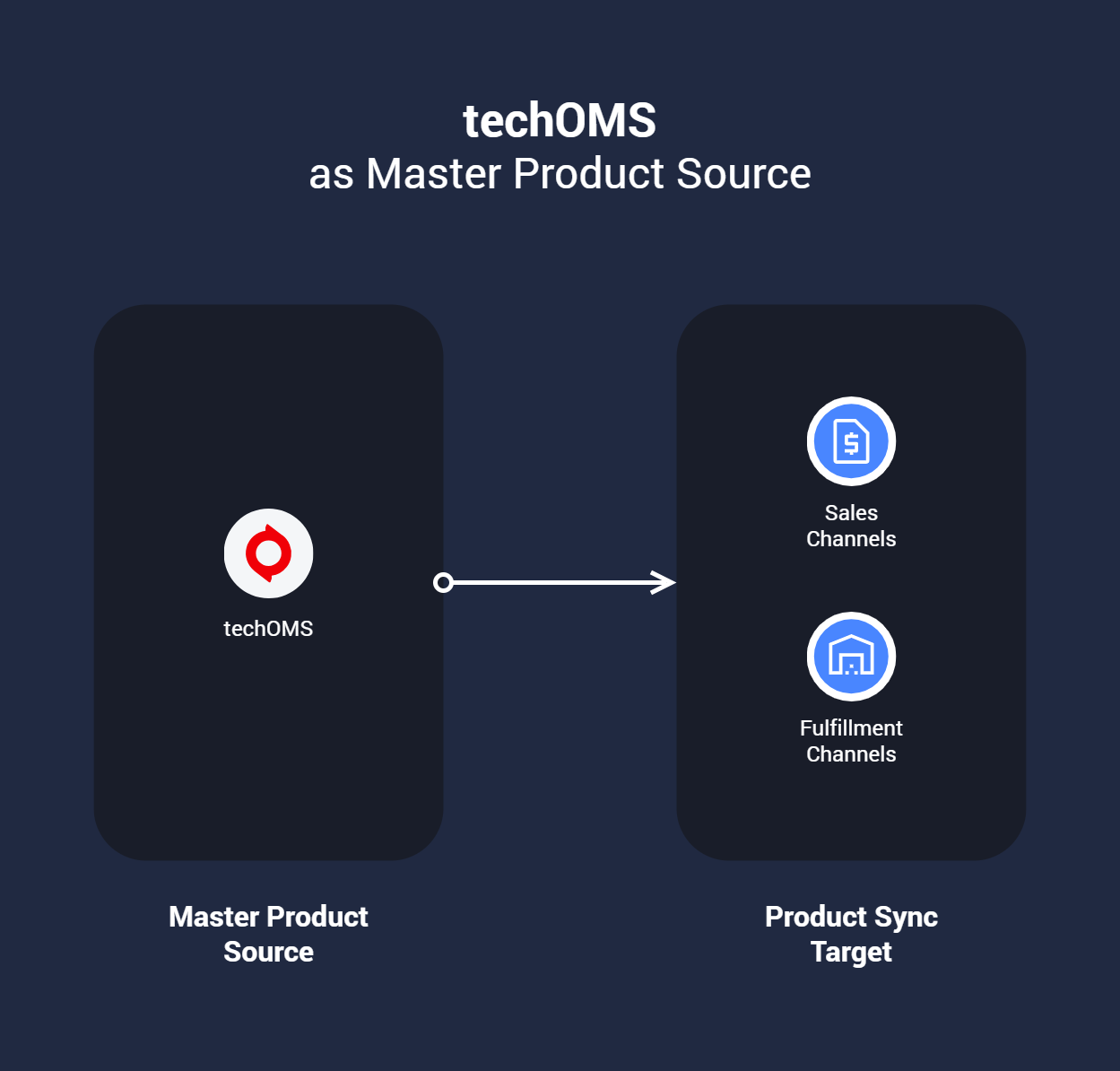
When you select techOMS as your Master Product Source, you manage your Product catalog directly in techOMS and use it as the origin of your Product data.
You can then synchronize your Products from techOMS to your connected Sales Channels and Fulfillment Channels.
Sales Channel
When you select a Sales Channel as your Master Product Source, you manage your Product catalog in that Sales Channel.
techOMS imports your Product data from the selected Sales Channel and then distributes it to your other configured Channels.
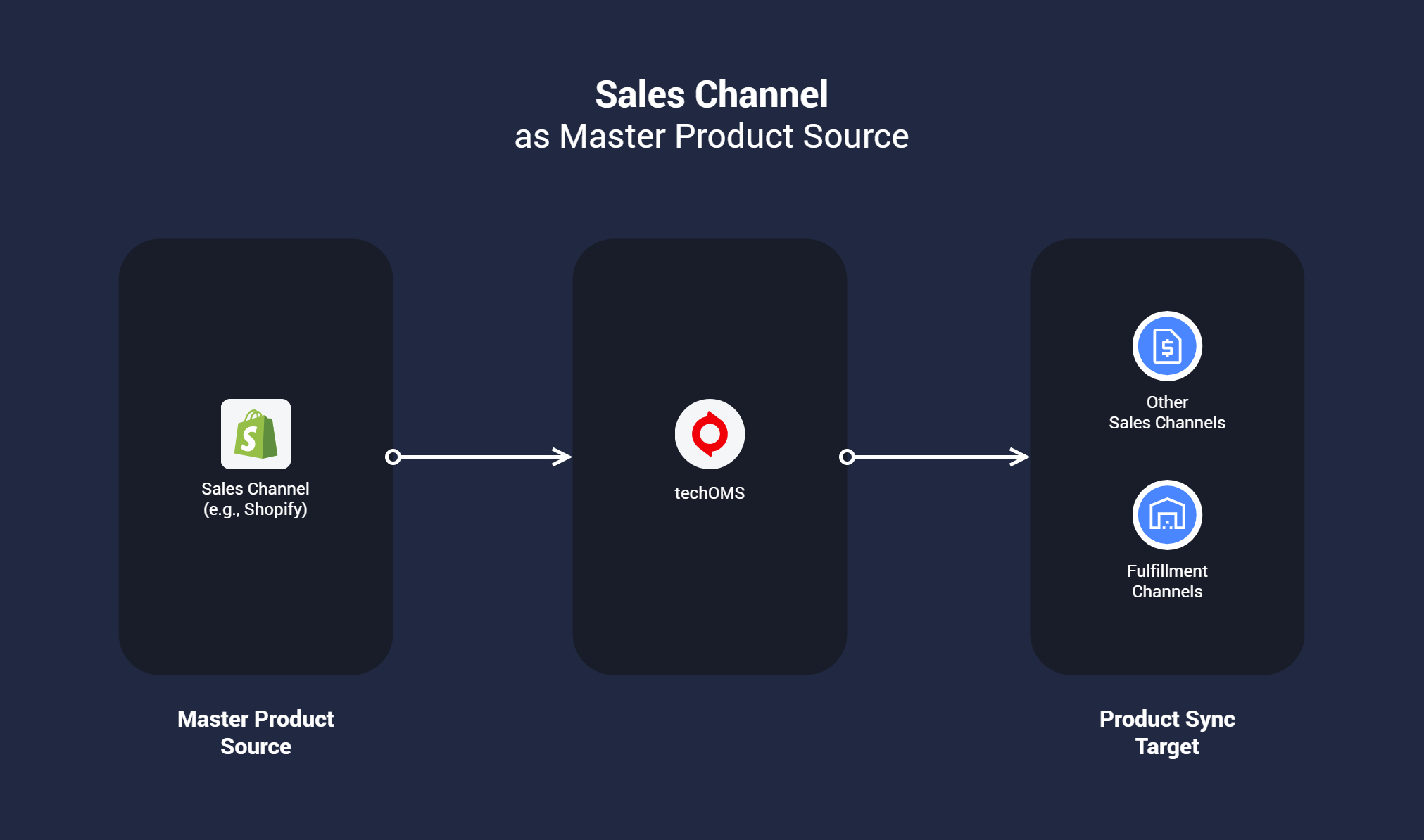
You can select only a Sales Channel that supports Product imports as your Master Product Source. For supported Channel capabilities, refer to techOMS Sales Channels - Master List [Guides List].
Fulfillment Channel
When you select a Fulfillment Channel as your Master Product Source, you manage your Product catalog in that Fulfillment Channel.
techOMS imports your Product data from the selected Fulfillment Channel and then distributes it to your other interconnected Channels.
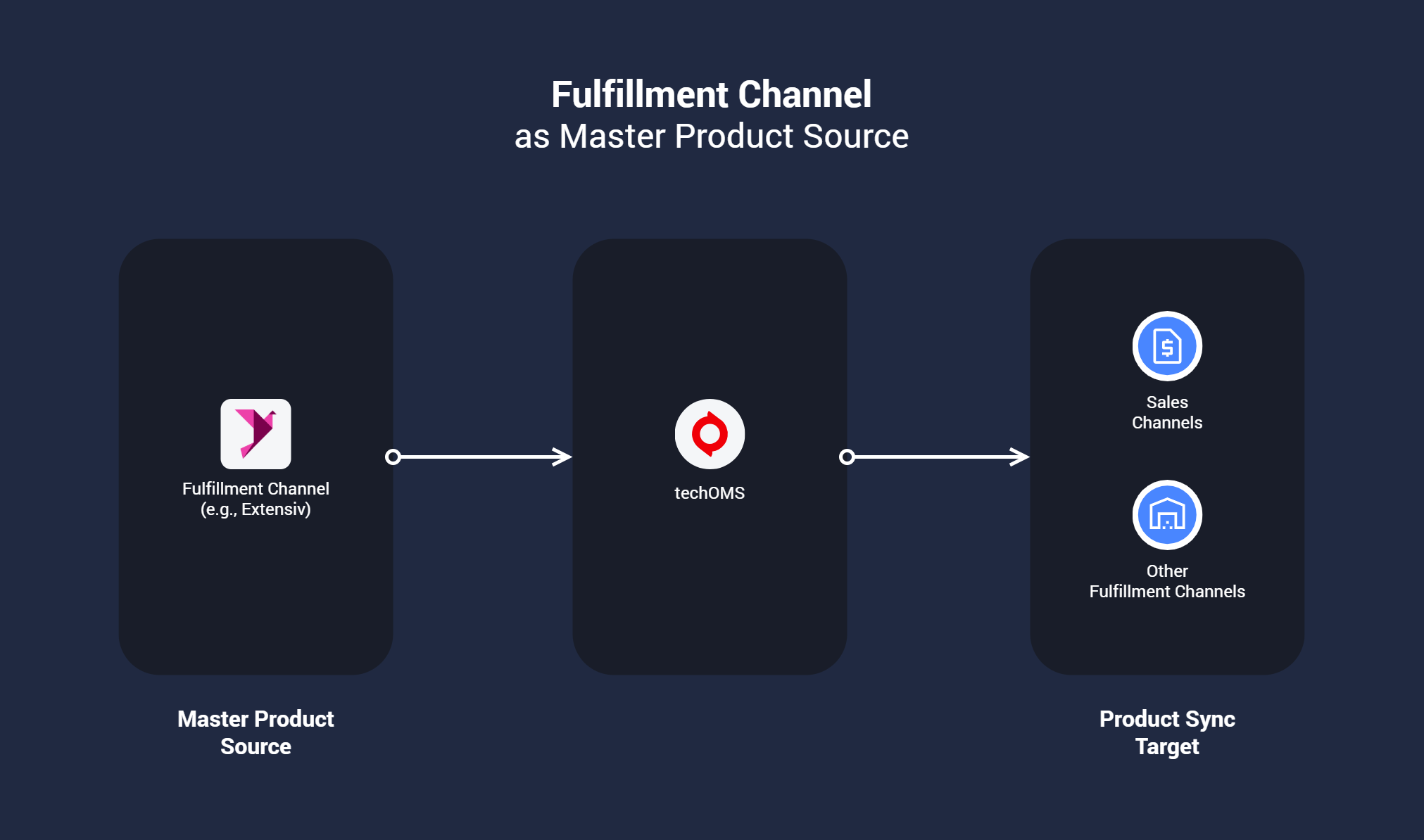
You can select only a Fulfillment Channel that supports Product imports as your Master Product Source. For supported Channel capabilities, refer to techOMS Fulfillment Channels - Master List [Guides List].
Final Considerations and Set Up
You can still create, edit, and delete Products in techOMS regardless of the Master Product Source you select. However, when techOMS is not your designated Master Product Source, you should consider how those changes interact with the authoritative Product catalog.
When techOMS is not your Master Product Source:
- Changes you make in techOMS can propagate to non-master Channels.
- Changes you make in techOMS do not synchronize back to your designated Master Product Source.
- Changes you make in techOMS may be overwritten during a later import from your Master Product Source.
To protect your Master Product Source as the authoritative catalog, techOMS disables the Product Import Recurring Job for non-master Channels and prevents competing import flows from redefining the same Product data.
| Whenever possible, manage your Products directly in the designated Master Product Source so your next Product import does not overwrite changes that you made elsewhere. | |
| | ||
Your Inventory synchronization remains independent of this setting. Regardless of the Master Product Source you select, techOMS continues synchronizing Inventory Levels according to your configured inventory flows.
After you determine which system should own your Product catalog, configure the Account setting by following How to Configure the Master Product Source [Step-by-Step Guide].
Was this article helpful?
That’s Great!
Thank you for your feedback
Sorry! We couldn't be helpful
Thank you for your feedback
Feedback sent
We appreciate your effort and will try to fix the article