This guide explains how to add and configure a FedEx - Nautical Client (Billing) Account.
A Client (Billing) Account assigns a carrier connection to a specific Client and defines how that carrier behaves for that Client.
 |
For a complete overview of supported carriers and related setup guides, refer to techSHIP supported Carriers - Master List [Guides List].
|
TABLE OF CONTENTS
Prerequisites
Before adding a (Billing) Account, ensure that:
The Client Profile has been created. See: How to create a Client profile [Step-by-Step guide].
This setup uses a Baseline Account as the foundation. To create and configure one specific to this carrier, see: How to Add a FedEx - Nautical Baseline Account [Guide].
Follow the configuration steps as described in How to Add a Client (Billing) Account [Step-by-Step guide] using the values provided below.
Carrier-Specific Instructions
The Carrier tab contains the FedEx - Nautical-specific configuration used to define operational behavior for this Client (Billing) Account. Fields in this view are grouped visually to distinguish mandatory (red-highlighted items) and optional (blue-highlighted items) carrier-specific settings.
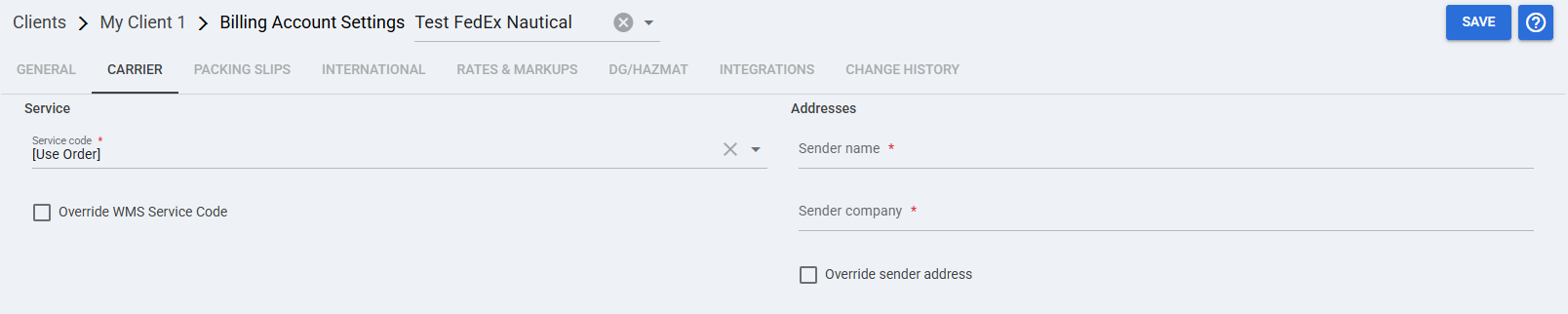
 | Service code: Leave this field as [Use Order] so the service selected on the order is passed through to the carrier request. |
 | Override WMS Service Code: Enable this setting only when the Billing account must override the WMS service code used for this client. |
 | Sender name: Enter the sender name that will be associated with this Billing account. |
 | Sender company: Enter the sender company name associated with this Billing account. |
 | Override sender address: Enable this setting when this Billing account must use a sender address different from the Baseline account. |
 | To enable carrier-specific settings —and before continuing—, press Save. |
Next Steps
You can now use this account to ship through FedEx - Nautical.
Was this article helpful?
That’s Great!
Thank you for your feedback
Sorry! We couldn't be helpful
Thank you for your feedback
Feedback sent
We appreciate your effort and will try to fix the article