The Recipient Notifications feature allows you to automatically send milestone-based tracking emails to your end customers as their packages progress. By proactively updating recipients on their delivery status, you can significantly reduce customer support inquiries.
This guide covers the core concepts of delivery notifications and how to configure the required Order Management Rules (OMR) to trigger them in techSHIP.
 | The Recipient Notifications feature must be previously enabled by Techdinamics. Contact Support to request the activation of this feature for your location before configuring the rules below. | |
TABLE OF CONTENTS
Understanding Recipient Notifications
When an order routes through an OMR specifically configured with the Recipient Notifications action, techSHIP signals the notification engine to send an automated email to the address stored in the Ship To Email field.
All tracking notifications are dispatched securely from noreply@techship.io. Every email also includes an Unsubscribe link at the bottom; if an end customer clicks this link, they are opted out of future notifications exclusively for that specific location.
| The email templates are fully managed by Techdinamics for each specific delivery milestone. These standardized templates automatically inject dynamic data, including the Tracking Number and Carrier information. | |
Eligibility and Suppression Rules
To prevent end customers from receiving duplicate or excessive emails, techSHIP applies strict eligibility and suppression logic based on the milestone type and your subscription tier.
MILESTONE | CAN TRIGGER MORE THAN ONCE? | DESCRIPTION |
Shipped |  | Triggered upon the first Enroute status. It is a strict one-time notification; all subsequent Enroute events for the same package are automatically suppressed. |
Delivered |  | Triggered when the tracking status is updated to Completed. Only one Delivered notification is sent; any subsequent events received after the Completed event are automatically suppressed. |
Delayed |  | Triggered upon the first Delayed status. Consecutive Delayed events are suppressed. The state resets if a different tracking status is received, allowing a new Delayed notification to be sent. |
| Certain advanced milestones, such as Delayed events, require a higher subscription tier. Always cross-reference the techSHIP Specifications Sheet [Information] to ensure your tier supports the desired tracking milestones before configuring your rules. | |
| | ||
Sample Notification Email
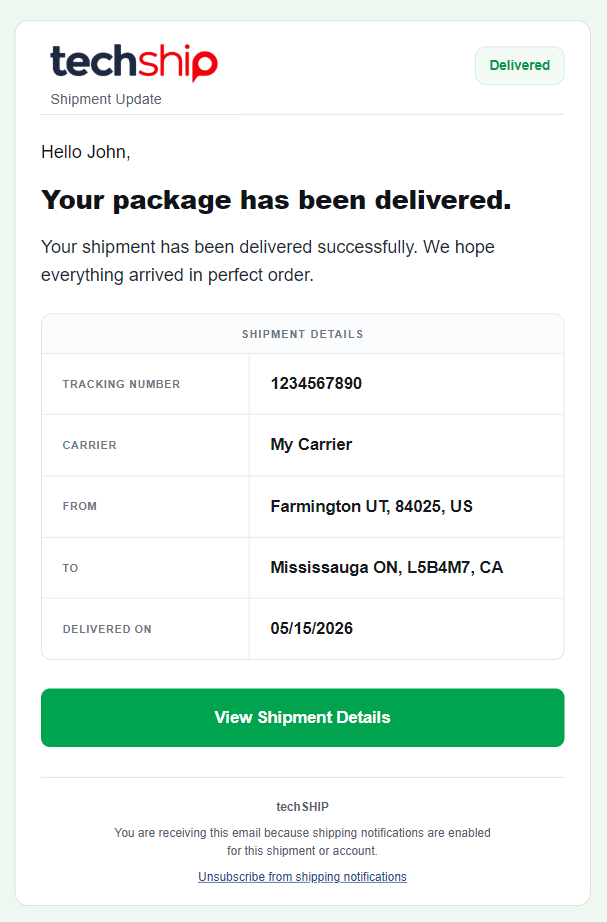
| The image above is a reference sample. Email templates are standardized and managed globally by Techdinamics to automatically inject your shipment's dynamic data. | |
Configuring the Recipient Notifications Action
| To learn how to build and configure an OMR, refer to What's New in Order Management Rules (OMR) for Rule Sets in techSHIP [Guide]. | |
To use the Recipient Notifications feature, you must configure it properly:
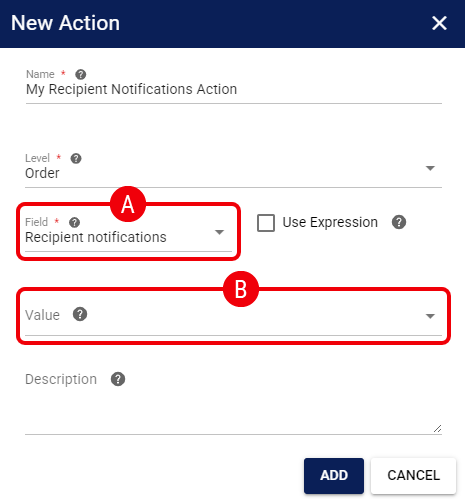
 | Field: Select Recipient Notifications. |
 | Value: Select one or more tracking events that should trigger an automated email for this rule. |
Once configured, the Recipient Notifications rule will automatically trigger emails for all new applicable orders based on the selected tracking milestones.
Was this article helpful?
That’s Great!
Thank you for your feedback
Sorry! We couldn't be helpful
Thank you for your feedback
Feedback sent
We appreciate your effort and will try to fix the article