To connect Canada Cartage CCS, first create the Fulfillment Channel connection, and then set up its parameters.
Once the connection is established between the channel and techOMS, you can use its supported features as listed in: techOMS Fulfillment Channels - Master List [Guides List].
This article is divided into the following sections:
- Onboarding Requirements
- Create the Fulfillment Channel
- Configure Additional Parameters
- Specific Behaviors
 NOTE: Make sure that you are operating at the correct Account beforehand.
I. ONBOARDING REQUIREMENTS
- Have all required connection settings available before setup, including the Api Url, User Name, Password, Company Code, Customer Code, API Key, and Throughput.
- Have access to the appropriate Canada Cartage CCS environment and credentials for the connection you will configure.
- Confirm the account uses the required Master Product Source configuration when importing products or receiving inventory levels from the channel.
II. CREATE THE FULFILLMENT CHANNEL
To create a Canada Cartage CCS Fulfillment Channel, follow: How to Create a Fulfillment Channel [Step-by-step guide].
III. CONFIGURE ADDITIONAL PARAMETERS
To configure additional parameters:
- Click Channels from the left menu under the Fulfillment Channels section.
- Click on the created channel's name.
- Use the highlighted areas in the screenshot below and configure the required settings.
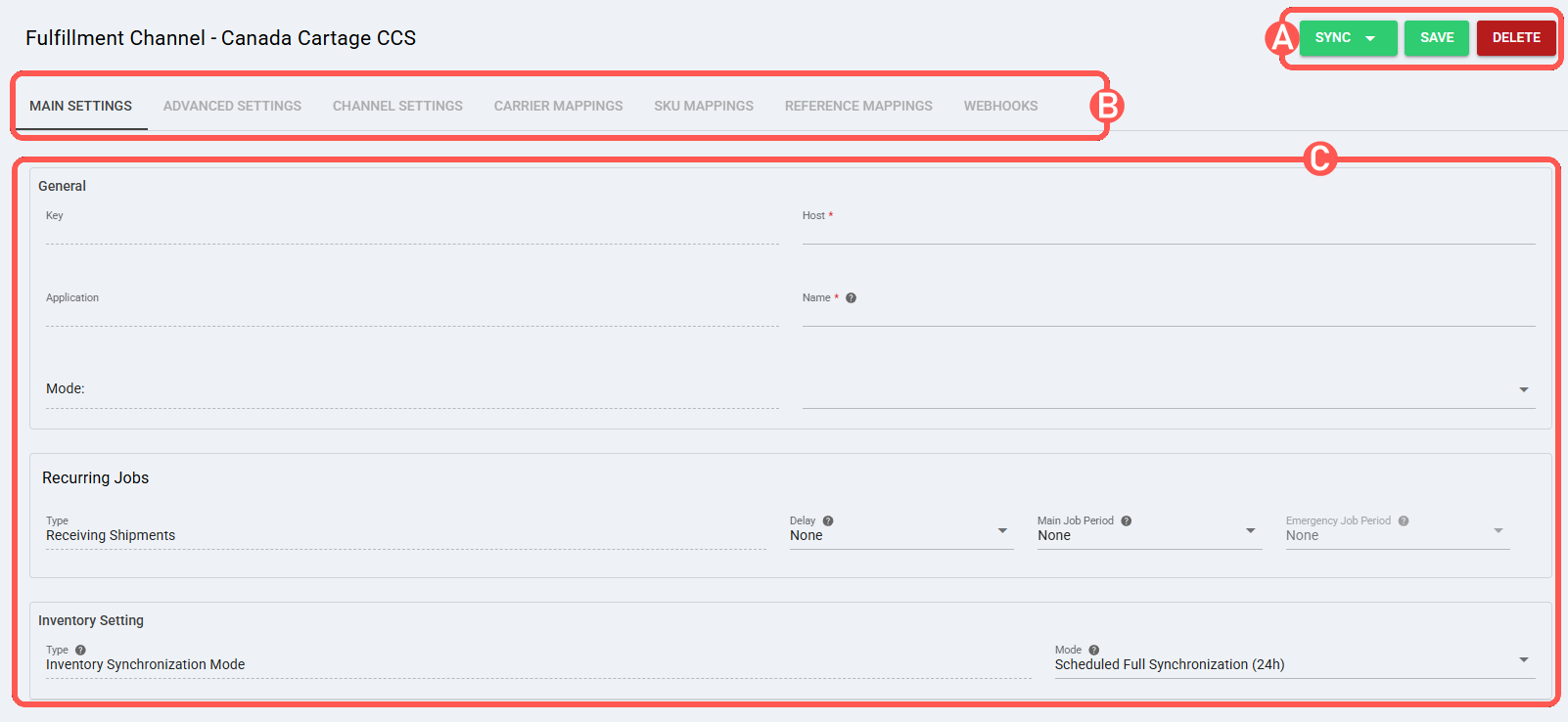
SECTIONS
A) QUICK ACTIONS lets you perform additional actions:
- Sync: Enables manual synchronization as detailed in How to Synchronize data through a Fulfillment Channel [Step-by-step guide].
Supported sync options:- Import Products from Channel: Imports products from the connected Fulfillment Channel.
- Receive Inventory Levels from Channel: Receives inventory levels from the connected Fulfillment Channel.
- Receive Shipments from Channel: Receives shipments from the connected Fulfillment Channel.
NOTE : The options displayed in the Sync dropdown are managed by techOMS based on the Master Product Source and the features supported by the specific Fulfillment Channel. NOTE : Product import uses inventory-related data from Canada Cartage CCS. If a product does not have an inventory record in the external system, it is not retrieved as part of the product import. NOTE : Product import creates new products and variants and updates existing product variants. Product deletion is not supported during product import. NOTE : The Description field is not mapped during product import because that value is not available through the API call used by this sync. NOTE : Shipment retrieval supports ID range only. Shipment data is available only after the order is closed or fulfilled in Canada Cartage CCS. WARNING : Canada Cartage CCS only accepts orders and shipments in the lowest unit of measure, Eaches.
- Save: Saves and commits changes.
- Delete: Deletes the channel connection.
B) VIEW SELECTION allows you to navigate the different tabs:
- Main settings (default): Configures general and automation behavior using: How to configure Automations for Sales/Fulfillment channels [Step-by-step guide].
- Advanced settings: Configures additional system/privacy settings using: How to manage Fulfillment Channels Advanced settings [Step-by-Step guide].
- Channel settings: Sets the channel integration parameters listed below.
 NOTE: The fields displayed in this section are dynamic. Based on your previous selections and the inherent capabilities of the channel, certain fields may be hidden, disabled, or cascaded.
Channel Settings (Fields)- Api Url: URL used to connect Canada Cartage CCS to techOMS. Format: https://{host}.
- User Name: User name used to authenticate the connection. Format: {username}.
- Password: Password used to authenticate the connection. Format: {password}.
- Company Code: Company code used by Canada Cartage CCS. Format: {companyCode}.
- Customer Code: Customer code used by Canada Cartage CCS. Format: {customerCode}.
- API Key: API key used to authenticate the connection. Format: {apiKey}.
- Throughput: Throughput setting used by the connection. Format: {throughput}.
- Carrier Mappings: Sets carrier/service name mappings as detailed in How to map Carriers and Services in a Fulfillment Channel [Step-by-step guide].
- SKU Mappings: Reviews and sets SKU mappings as detailed in How to map SKUs in a Fulfillment Channel [Step-by-step guide].
- Reference Mappings: Sets reference mappings for the channel as detailed in How to map References in a Fulfillment Channel [Step-by-step guide].
NOTE : When Reference Mappings are configured, order and shipment references are copied to EdiHeaderData, and line references are copied to EdiDetailData. Each reference is sent as a paired EdiDataID and Value object. Use Order Rules to populate the required order and line references before sending the order. For instructions, refer to: How to Create Sales/Purchase Order Rules [Step-by-step guide].C) CONTENT VIEW displays and/or allows editing of the settings in the "View Selection" section.
- Recurring Jobs: Configures recurring automation jobs as detailed in How to configure Automations for Sales/Fulfillment channels [Step-by-step guide].
WARNING : Remember to press Save to commit the changes made in this section.IV. SPECIFIC BEHAVIORS
- Packages: In SSCC, each case is received as a package in techOMS. CaseLabel is used as the container number.
- Lots: Lot information is received from ItemLevel2 at the package level and from InventoryLevel2 in DetailLine at the shipment-line level. Expiration Date is also available in techOMS.
Was this article helpful?
That’s Great!
Thank you for your feedback
Sorry! We couldn't be helpful
Thank you for your feedback
Feedback sent
We appreciate your effort and will try to fix the article